All Exercises in This Part
-
Create an interface named
Converter. Define a single method in the interface:String convert(String input);Remember that methods in an interface do not have a body (no curly braces{}). -
Create the classes
Lowercase,Uppercase, andCapitalize, which implement theConverterinterface.- The
convertmethod of theLowercaseclass converts the given string to lowercase.convert("Hello World")->"hello world". - The
convertmethod of theUppercaseclass converts the given string to uppercase.convert("Hello World"->"HELLO WORLD". - The
convertmethod of theCapitalizeclass converts the given string so that only the first letter is uppercase and all other letters are lowercase.convert("HELLO WORLD")->"Hello world"
- The
-
Test your program using the provided main program.
Spies send messages to each other, but the encryption method changes daily so that the enemy cannot figure out the logic. We need an interface that allows us to switch the encryption algorithm on the fly.
- Create an interface
Encryptor. Define the following two methods in the interface:
String encrypt(String message);
String decrypt(String encryptedMessage);
-
Implement three different classes:
Reverser,Hacker, andNextLetter, which implement theEncryptorinterface using the following logic:-
Reverser (Mirror Writing) Reverses a word or message. Example: "Agent" → "tnegA" Hint: You can use the
reverse()method of theStringBuilderclass or a loop that processes the string from end to beginning. -
Hacker ("Leet Speak") Replaces certain letters with numbers or symbols. "Agent" → "@g3nt"
-
'a' -> '@'
'e' -> '3'
'i' -> '!'
'o' -> '0'
- NextLetter (Caesar Shift)
Moves each letter one position forward in the alphabet.
Example: abc -> bcd.
Hint: In Java,
charis a numeric type, so you can use:character + 1.
Examples:
'a' -> 'b'
'b' -> 'c'
'k' -> 'l'
and so on.
In this exercise, you do not need to worry about wrapping around the alphabet for letters such as z, å, ä, or ö, unless you want to.
You also do not need to worry about encryption and decryption always restoring the exact original message. For example, when using the Hacker encryptor, if the original message actually contains the character @, the decrypt() method will convert it to a. This is acceptable for this exercise, although a real encryption system should ensure that no information is accidentally lost or altered.
A main program is provided in TIM for testing your class structure.
Let's implement a simple text adventure game (or, more accurately, a small part of one), where the player can try to pick up items from the ground and eat food to gain energy.
You are provided with two interfaces: Edible and Pickable.
You are also provided with partially implemented classes: Apple and LargeRock, which implement these interfaces.
In addition, you are given a partially implemented main program that keeps track of the player's energy and backpack capacity.
Complete all sections marked with the word TODO so that the program behaves according to the instructions.
Create a Robot that can perform various household tasks, such as vacuum cleaning and watering plants.
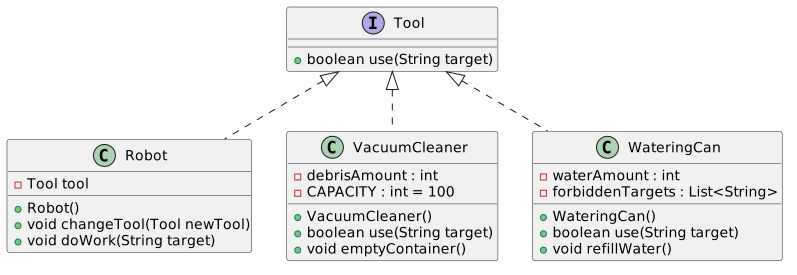
Implement the exercise according to the UML diagram below. A dashed line with a filled arrow means that the Robot class uses the Tool interface: the Robot class contains an attribute whose type is Tool.
Textual description
The following is a description of the classes and their required features (corresponding to the UML diagram):
The Robot class has the following methods:
-
void changeTool(Tool tool): Changes the tool used by the robot (for example, a vacuum cleaner or a watering can). -
void doWork(String target): Performs a household task. If the target is on the forbidden list of the currently selected tool (for example, aWateringCanobject must not be used on the target"Computer"), the robot should print an error message. Forbidden targets are defined as a string list attribute of the tool. -
A
WateringCanobject does not water if there is not enough water available. It can be refilled using therefillWater()method. The watering can initially contains 50 units of water. If you wish, you may create an additional constructor that allows a different initial water level. -
A
VacuumCleanerobject does not vacuum if its dust container is full. The container can be emptied using theemptyContainer()method. The container capacity is 100 units. If you wish, you may create an additional constructor that allows a different initial fill level. -
Both tools return a boolean value from the
use(String target)method indicating whether the task was completed successfully.
Study the Java documentation. Answer the questions about the Comparable interface.
The exercise is based on a Person class in its own file and a sortPeople method in main.java. However, the method does not work because it uses Java's built-in Collections.sort method, and the Person class does not provide the required support for it.
Modify the Person class so that lists of type List<Person> can be sorted alphabetically by a person's name using the Collections.sort method.
For example, the list
List<Person> people = Arrays.asList(
    new Person("Joukahainen"),
    new Person("Ilmatar"),
    new Person("Kyllikki"),
    new Person("Kokko")
);
should be in the following order after calling
Collections.sort(people);:
- Ilmatar
- Joukahainen
- Kokko
- Kyllikki
Continuation of the previous exercise. The Person class has now been updated so that a person's name is divided into a last name and first name(s).
Modify the updated Person class so that List<Person> collections can be sorted using the Collections.sort method in alphabetical order by last name and first name(s), with the primary sorting criterion being the last name.
For example, the list
List<Person> people = Arrays.asList(
        new Person("Pacius", "Fredrik"),
        new Person("Mozart", "Wolfgang Amadeus"),
        new Person("Mozart", "Leopold"),
        new Person("Chopin", "Frédéric")
);
should be in the following order after calling
Collections.sort(people);:
- Chopin Frédéric
- Mozart Leopold
- Mozart Wolfgang Amadeus
- Pacius Fredrik
Create a generic method findLargest that finds the largest element in a list.
The list passed as a parameter must contain elements that implement the Comparable interface, but otherwise the list may contain elements of any type.
Do not use any of the built-in methods from the Collections class.
Create a class Container that uses generics and acts as a simple container for a single object of any type.
Add an attribute content, which can store an object of any type. Also add a string attribute owner. Create a constructor that receives these values as parameters.
Also add the getter methods getOwner, getContent, and getType, where the last one returns the type of the container's content as a string. Override the toString method so that it returns all of this information in a single string.
A main program is provided for testing the functionality of the class.
Hint
You can obtain the type of an object as a string using the method
object.getClass().getSimpleName().
Create a class LargeContainer that acts as a container for multiple objects of any type. Objects are packed into the container so that the most recently added object is always the first one to be removed.
Add a list as an attribute to store the objects.
Also add the following methods:
-
addadds the object given as a parameter to the end of the list. -
takereturns the most recently added object and removes it from the list. -
peekreturns the most recently added object without removing it from the list. -
containstakes an object as a parameter and returnstrueif the object is found in the container. Otherwise, it returnsfalse. -
printprints the contents of the container. You may decide the output format yourself.
A main program is provided for testing the functionality of the class.
Add two methods to the LargeContainer class from the previous exercise.
-
The class method (static)
sumNumberstakes aLargeContainerobject as a parameter. The container contains numbers, meaning objects of typeNumberor any of its subclasses. The method returns the sum of all numbers in the container. -
The instance method
transferAlltakes anotherLargeContainerobject as a parameter and transfers the contents of the container on which the method is called into the other container. The other container must be of a type that can contain objects of this container's type.
A main program is provided for testing the functionality of the class.
Hint
You will need type bounds in this exercise.
-
All objects of type
Numberhave adoubleValue()method, which returns their value as adouble. -
Note that the container types do not have to be exactly the same. A
LargeContainer<Number>can containIntegerobjects becauseIntegeris a subclass ofNumber.
Create a generic function that copies all elements of type T from one list to another list, whose type may be T or a superclass of T.