Inheritance
Learning Objectives
After completing this chapter, you will:
- Understand the concept of inheritance in object-oriented programming and know how to inherit classes in Java.
- Be able to create a simple class hierarchy where one class inherits from another.
- Understand that all Java classes ultimately inherit from the
Objectclass.
Inheritance is a mechanism that allows a class to include the properties (attributes) and behaviors (methods) of another class. This enables code reuse and the creation of hierarchies between classes.
In practice, objects often share common characteristics. One way to handle these shared characteristics without duplicating code is through inheritance.
Student Information System
Let's consider an imaginary student information system.
Olli Student, Maija Teacher, and Satu Secretary could all be objects in a fictional student information system called Kisu. They all share properties common to all users, such as a name and a username. Each user should also be able to log in to and log out of the system.
However, each user also has characteristics specific to their role: A student may have a list of courses they are enrolled in and the credits they have earned. A teacher has courses they teach and a job title but does not have earned credits. A secretary is responsible for recording completed courses and awarding degrees but does not have a student number or teaching assignments.
Let's start with a simpler version of the system.
Below are Student and Teacher classes containing a few attributes and methods. Examine these classes.
warning
Many of the examples below are missing documentation comments, or the comments may be incomplete. This is intentional, as adding full documentation would make the example code considerably longer and more difficult to read. In this material, the surrounding text serves as the primary explanation of the code.
warning
The example below is intended to demonstrate inheritance syntax and therefore does not yet follow all best practices. In particular, assigning a name directly through a public setName method violates the principle of information hiding (see Chapter 2.3). We will fix this issue later as the example progresses.
import java.util.*;

class Student {
    String name;
    List<String> currentCourses;

    public Student() {
        this.currentCourses = new ArrayList<>();
    }

    void setName(String name) {
        this.name = name;
    }

    String getName() {
        return this.name;
    }

    void showStudyProgram() {
        String courses = String.join(", ", currentCourses);
        IO.println(name + " studies the following courses: " + courses);
    }

    void enrollInCourse(String course) {
        IO.println(this.name + " enrolled in course: " + course);
        currentCourses.add(course);
    }
}
Notice that both classes contain the same name attribute as well as the methods getName and setName.
Although the classes also have differences, the duplication is problematic because:
- Every class must redefine the same properties and behaviors.
- If we want to change a shared property or behavior, we must make the change in multiple places.
- Adding a new class with the same characteristics requires copying the same code yet again.
Suppose we wanted to change the name attribute so that first and last names are stored separately. We would need to make the same modification in every class.
This increases the likelihood of errors and makes maintenance difficult.
One of the key principles of software development is
Don't Repeat Yourself (DRY) (see Wikipedia)
Class Hierarchy
To avoid duplication, we can create a superclass called Person that contains all shared properties and behaviors.
The subclasses Student and Teacher can then inherit from the Person class and automatically gain access to all of its attributes and methods.
This allows us to add only the role-specific functionality to each subclass without duplicating common code.
Let's create a new Person class and modify the Student and Teacher classes so that they inherit from it.
In Java, inheritance is implemented using the extends keyword.
For example: class Student extends Person
means that the Student class inherits from the Person class.
Let's make that change.
public class Person {
    String name;

    String getName() {
        return this.name;
    }

    void setName(String name) {
        this.name = name;
    }
}
Notice that the Student and Teacher classes no longer define the name attribute or
the getName method or the setName method
because these are inherited from the Person class.
The code is now considerably cleaner and easier to maintain.
Inheritance defines one
superclass (Person) and
one or more subclasses (Student, Teacher)
that extend the superclass with additional information and functionality.
In other words, when Student and Teacher inherit from Person, they gain access to all non-private attributes and methods defined in Person.
Private members remain part of the object's internal structure but are not directly available to subclasses. They are generally not considered part of the object's public interface.
In the literature, you may also encounter the terms base class (superclass) and derived class (subclass). These terms mean the same thing. In this material, however, we mainly use the terms superclass and subclass.
Inheritance can be represented using a diagram such as the following:
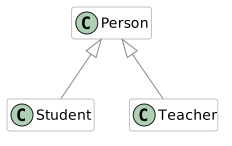
Here:
- Big letter
Cmeans Class Personis the superclass.StudentandTeacherare subclasses.- The inheritance arrow points from subclass to superclass.
This type of diagram is based on UML (Unified Modeling Language).
Constructors and the super Keyword
Constructors defined in a superclass can be called from a subclass using the super keyword.
Let's look at an example where such a call becomes necessary.
Our previous example has a couple of problems. The Person class does not have a constructor, so the name is initialized through the setName method instead. This means that after a Person object has been created, the name attribute is initially null until it is explicitly assigned a value.
This is not good practice for two reasons:
an object should ideally be ready for use immediately after it is created, without requiring additional initialization.
Secondly setting the name through a public setName method breaks the principle of encapsulation.
While there may be situations where changing a person's name is necessary in a student information system, allowing any object to change the name of any Person object through a public method is not desirable. Such changes should occur through a much more controlled process.
Let's improve the design.
First, make the name attribute private in the Person class. Then add a constructor that receives a name as a parameter and initializes the attribute accordingly.
After that, we can remove the setName method entirely, making the constructor the only way to assign a name. This means the name can no longer be changed after object creation, which is acceptable for our purposes at this stage.
We must also update object creation in the main program to use the new constructor.
class Person {

    // HIGHLIGHT_GREEN_BEGIN
    private String name;

    public Person(String name) {
        this.name = name;
    }
    // HIGHLIGHT_GREEN_END

    // HIGHLIGHT_RED_BEGIN
    void setName(String name) {
        this.name = name;
    }
    // HIGHLIGHT_RED_END

    public String getName() {
        return this.name;
    }
}
Now that Person defines a constructor that takes parameters, Java no longer automatically creates a default no-argument constructor.
As a result, the compiler produces an error similar to the following:
java: constructor Student in class Student cannot be applied to given types;
    required: no arguments
    found: java.lang.String
    reason: actual and formal argument lists differ in length
The essential point of this error message is that the constructor of Student does not match the way we are trying to create the object.
A very important observation follows from this:
classes do not inherit constructors from their superclasses.
For example, the Student class does not inherit the constructors of the Person class. Constructors must be defined separately in each subclass.
Let's add constructors to both Student and Teacher.
The beginning of the Student constructor might look like this:
class Student extends Person {
    public Student(String name) {
        // Constructor body goes here
    }
}
However, since we made the name attribute private, we cannot assign it directly in the subclass:
class Student extends Person {
    public Student(String name) {
        // HIGHLIGHT_YELLOW_BEGIN
        this.name = name;
        // HIGHLIGHT_YELLOW_END
    }
}
This results in compiler errors such as:
Student.java:6:5
java: constructor Person in class Person cannot be applied to given types;
  required: java.lang.String
  found:    no arguments
  reason: actual and formal argument lists differ in length

Student.java:8:13
java: nimi has private access in Person
The second error is our current concern. Because name is private, subclasses cannot access it directly.
Since the setName method was removed, the only way to initialize the name is to call the superclass constructor from within the subclass constructor and pass the required parameter to it.
This is done using the super keyword.
Let's modify both subclasses accordingly and make the remaining attributes private as well.
import java.util.*;
class Student extends Person {
    // HIGHLIGHT_GREEN_BEGIN
    private ArrayList<String> ongoingCourses;
    // HIGHLIGHT_GREEN_END


    // HIGHLIGHT_GREEN_BEGIN
    public Student(String name) {
        super(name);
        ongoingCourses = new ArrayList<>();
    }
    // HIGHLIGHT_GREEN_END
    // ...
}
Notice that the call to super(...) is usually the first statement in a constructor.
With certain restrictions, the super(...) call may also appear elsewhere in the constructor body (see JEP 513: Flexible Constructor Bodies).
Make the same change to the Teacher class.
After doing so, the program still will not compile because the subclasses are still attempting to access the superclass's private name attribute directly.
class Student extends Person {
    void showStudyPlan() {
        String courses = String.join(", ", ongoingCourses);
        // HIGHLIGHT_YELLOW_BEGIN
        IO.println(this.name + " is studying: " + courses);
        // HIGHLIGHT_YELLOW_END
        // Compilation error: name is private
    }
}
The only way to access the name attribute is through the superclass's public getName() method.
Replace all direct references to the name attribute in subclasses with calls to getName().
For example:
public class Person {
    String name;

    public Person(String name){
        this.name = name;
    }

    public String getName() {
        return this.name;
    }
}
After making these changes, the program compiles successfully again.
We no longer need a no-argument constructor, so we will simply leave it unimplemented.
UML Representation
In UML diagrams, it is common to include not only inheritance relationships but also information about attributes, methods, and their visibility. Attributes are listed below the class name, and methods—including constructors—are listed beneath the attributes. Inherited members are usually omitted from the subclass unless they are overridden—more from this in Part 3.2. Green ball means public visibility and a red square means a private attribute/methods. These diagrams allow us to describe program structure without needing to explain every implementation detail in prose.
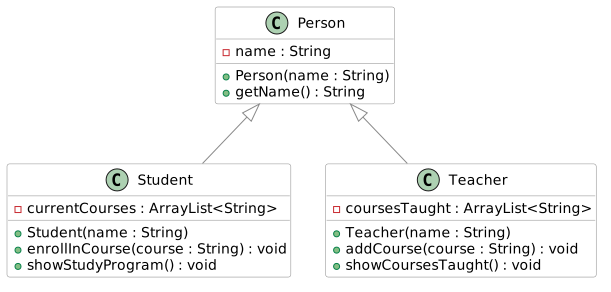
A class hierarchy can be more than two levels deep.
For example, we might also have a Secretary class that can record completed studies. The Secretary class would inherit directly from Person.
We might also distinguish between different types of students:
DegreeStudent and OpenUniversityStudent
A DegreeStudent could belong to a degree program and
an OpenUniversityStudent might not belong to a degree program, but instead would need to pay fees before receiving study credits.
In such a hierarchy:
DegreeStudent and OpenUniversityStudent inherits from Student.
and since Student inherits from Person, both subclasses also indirectly inherit from Person.
This means that a DegreeStudent object inherits:
all non-private members of Student and also
all non-private members of Person
The same is true for an OpenUniversityStudent object.
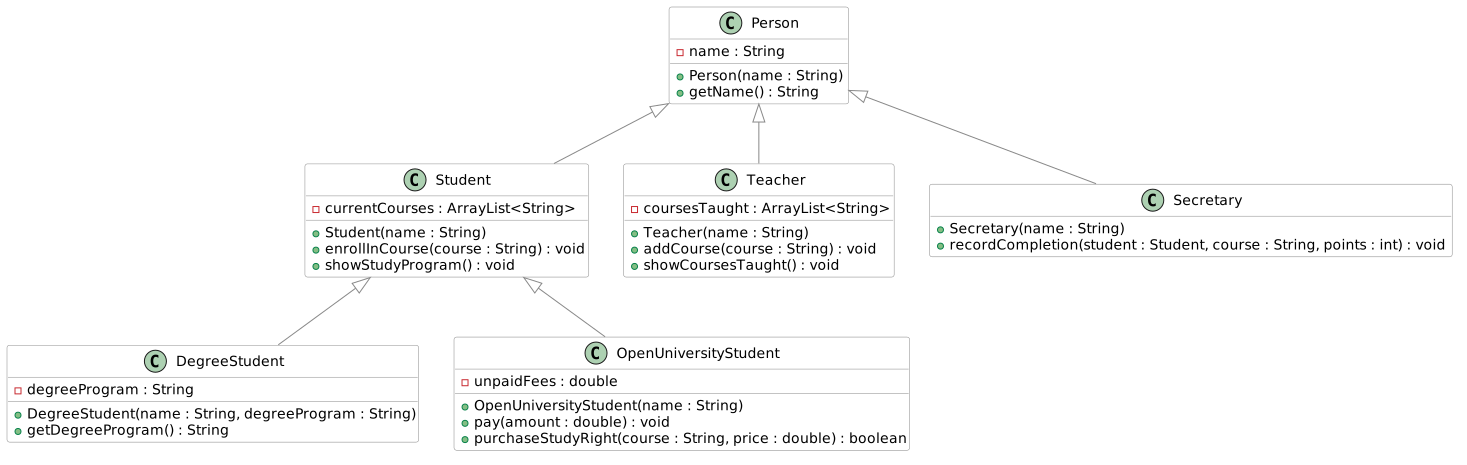
We don't implement this system, but you can find the code in finnish here.
One final note: calling a superclass constructor with super(...) always invokes the constructor of the immediate superclass.
You cannot "skip levels" in the hierarchy with something like: super().super();
For example, a constructor in DegreeStudent can directly call only the constructor of Student, not the constructor of Person.
Methods and the super Keyword
The super keyword can also be used when calling a method inherited from a superclass. It allows us to explicitly refer to the superclass version of a method.
class Student extends Person {

    // ...
    public void showCourses() {
        String allCourses = String.join(", ", ongoingCourses);
        // HIGHLIGHT_RED_BEGIN
        IO.println(this.getName() + " is studying: " + allCourses);
        // HIGHLIGHT_RED_END
        // HIGHLIGHT_GREEN_BEGIN
        IO.println(super.getName() + " is studying: " + allCourses);
        // HIGHLIGHT_GREEN_END
    }
}
In this example, using this.getName() or super.getName() produces exactly the same result because the getName() method exists only in the superclass and has not been redefined in the subclass.
In the next chapter, 3.2 Polymorphism, we will examine situations where a subclass defines a method with the same name as one in the superclass. In such cases, the super keyword allows us to specifically invoke the superclass implementation.
A Note About the Absence of Multiple Inheritance
In Java, a class can inherit from only one class. Some other programming languages, such as C++, support multiple inheritance, where a class may inherit from more than one superclass. We will not explore multiple inheritance in detail here, but it is worth mentioning that it can introduce certain complications. One famous example is the Diamond Problem, where the same member may be inherited through multiple paths in the inheritance hierarchy.
You may sometimes read that Java's interfaces provide functionality somewhat similar to multiple inheritance. While there are similarities, interfaces are fundamentally a different concept and serve a different purpose. Interfaces will be covered later in the course.
Exercises
Create a class called Product. Give it the attributes name (a string) and
price (a decimal number). Initialize the attribute values in the constructor.
Also create a method void printDetails() that prints the product's name and
price in the format "Name: Price €".
Create the classes Clothing and Food that inherit from the Product
class. The constructors of the derived classes do not need to do anything
other than call the superclass constructor with the correct values.
Now create two different clothing items and two different food products in
your program and print their details by calling the
void printDetails() method.
Let's continue from the previous exercise. Also create a class Electronics
that inherits from the Product class. Add the following special features to
each subclass:
-
Clothing: attribute
String size(e.g., "M", "L", etc.), and a methodvoid tryOn(String customerSize)that prints whether the clothing item is suitable for the person trying it on. -
Electronics: attribute
int warrantyMonths(e.g., 24), and a methodint warrantyRemaining(int monthsElapsed)that returns how many months of warranty are left (or 0 if the warranty has expired). -
Food: attribute
String bestBefore(e.g., "31.01.2026"), and a methodvoid eat()that prints: "You consume food whose expiration date is DD.MM.YYYY." (replace DD.MM.YYYY with the value ofbestBefore).
Note that the constructors of the subclasses must now call the superclass constructor with the correct values and also initialize their own attributes.
A main program has been provided for you on the exercise page. Use it to test your classes. It must not produce any compilation or runtime errors. However, you may add your own code to the main program if you wish.
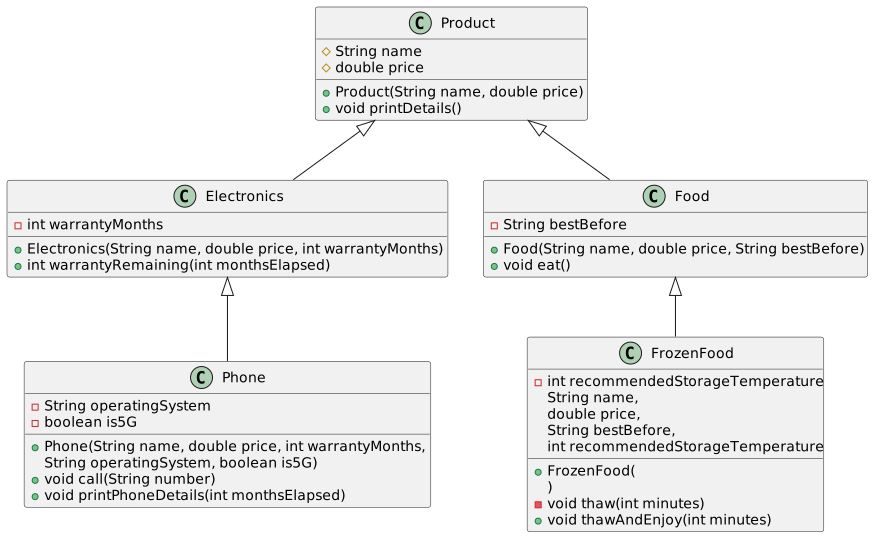
Extend the online store class hierarchy you created earlier according to the UML diagram below.
A main program has been provided on the exercise page, which you can use to test your classes. You can also view the sample output produced by the program.
Open the example output here.
Calling inherited methods:
Dulce & Käppänä Winter Jacket: 120.0 €
Reissurähjä Rye Bread: 2.5 €
HighPower Computer: 899.0 €

----------------------------

Calling subclass-specific methods:
Test 1: Trying it on a user who wears size M:
Trying on the clothing item Dulce & Käppänä Winter Jacket...
This may not be the best fit. You wear size M, but this clothing item is size L.

Test 2: Trying it on a user who wears size L:
Trying on the clothing item Dulce & Käppänä Winter Jacket...
Great! Size L fits you perfectly!

Eating Reissurähjä Rye Bread.
The best-before date was 20.12.2024. Hopefully it's still good.

Warranty remaining: 19 months.

pHone: 999.99 €
Phone warranty remaining: 19 months
Operating system: Orange
Connection type: 4G
Calling from Orange (4G) to 0401122330

Pea Bag: 0.99 €
You thawed the frozen food Pea Bag for 10 minutes.
Recommended storage temperature is -18 °C.
Eating Pea Bag.
The best-before date was 31.5.2026. Hopefully it's still good.
Task Description
Below is a description of the new classes and their required features. The same information can also be found in the UML diagram.
-
Phone(inherits fromElectronics)-
Add the attributes:
private String operatingSystem(e.g."Droid"or"AiOS")private boolean is5G
-
Add the methods:
public void call(String number). The method prints, for example:Calling from Orange (4G) to 0401122330public void printPhoneDetails(int monthsElapsed). The method should first call the inherited method (printDetails()), and then print additional phone-related information(remaining warranty, operating system and 5G support)
-
-
FrozenFood(inherits fromFood)-
Add the attribute:
private int recommendedStorageTemperature(e.g.-18)
-
Add the method:
private void thaw(int minutes)(note theprivatemodifier) When called, the method prints, for example:You thaw the frozen food for 10 minutes. Recommended storage temperature: -18 °C.
-
Add the method:
public void thawAndEnjoy(int minutes)- The method first calls
thaw(minutes)and then the inheritedeat()method.
-
UML Diagram