Polymorphism
Learning Objectives
After completing this chapter, you will:
- Understand the basic idea of polymorphism.
- Be able to override a superclass method in a subclass and prevent overriding with the
finalkeyword. - Be able to write a small program that utilizes polymorphism.
- Recognize overridable methods inherited from
Object, such astoString().
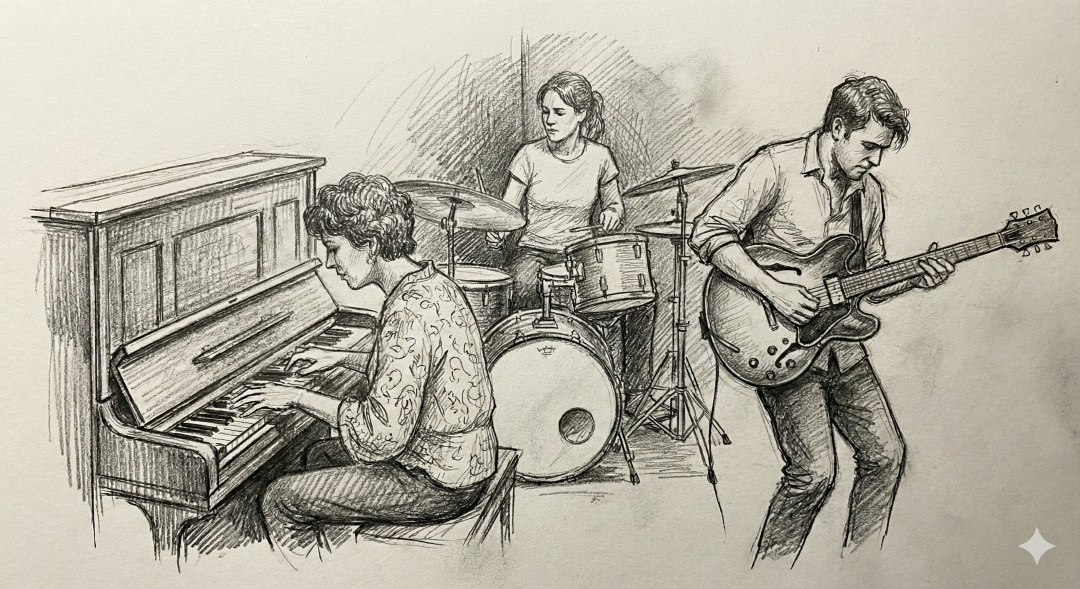
Polymorphism refers to the ability in object-oriented programming to treat different kinds of objects in a uniform way. When a method is called, the decision about which implementation is actually executed is made at runtime based on the object's real type. Polymorphism makes it possible to write flexible code where new object types can be added without requiring changes to existing code.
Polymorphism is usually divided into two main categories: (1) Compile-time polymorphism, also called static binding and (2). Runtime polymorphism.
In Java, compile-time polymorphism refers to method overloading. This topic was covered in Programming 1, so we will not discuss it in detail here. Briefly, method overloading means that a method may have multiple implementations that differ in the number of parameters, parameter types, or return type. Refer to the Programming 1 material for more information.
This may all sound a bit abstract, so let's look at a concrete example!
Method Overriding and Dynamic Binding
Imagine a program that contains different musical instruments: a Guitar, a Piano, and a DrumSet.
We want to be able to play these instruments. One possibility would be to create a separate method for each instrument:
Guitar guitar = new Guitar();
guitar.playGuitar();
Piano piano = new Piano();
piano.playPiano();
DrumSet drumSet = new DrumSet();
drumSet.playDrums();
This approach is not very extensible. If we wanted to process instruments as a group—for example, in a list—we would need awkward and error-prone type checks just to determine which play method should be called.
The solution is to find something common to all instruments.
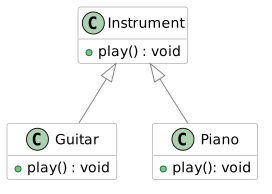
After all, both guitars and pianos are instruments. Let's create a superclass called Instrument that contains a behavior every instrument should support: play().
note
The Instrument class is defined here as a regular class, although it could also be an abstract class. Since abstract classes will not be covered until Chapter 3.3 Abstract Classes, we will keep it as a regular class for now.
public class Instrument {
    // Every instrument has a play() method.
    public void play() {
        IO.println("An unknown instrument is playing.");
    }
}
Now we can define Guitar and Piano as subclasses of Instrument.
public class Guitar extends Instrument {
    // ...
}

public class Piano extends Instrument {
    // ...
}
We now have a common method name, but if we call play() on either a Guitar or a Piano, they will both execute the superclass implementation: "An unknown instrument is playing."
That is not sufficient!
We want each instrument to play in its own distinctive way. To achieve this, a subclass can override a superclass method with its own specialized implementation.
Overriding is indicated using the @Override annotation. Although the annotation is not required by Java syntax, it is strongly recommended because it helps both the programmer and the IDE recognize that the method is intended to override an inherited method.
In the assignments for this course, the @Override annotation is required.
public class Guitar extends Instrument {
    // Override Instrument.play()
    @Override
    public void play() {
        IO.println("The guitar plays and its strings are plucked.");
    }
}

public class Piano extends Instrument {
    // Override Instrument.play()
    @Override
    public void play() {
        IO.println("The piano plays and its keys are pressed.");
    }
}
Inheritance gave us a common type (Instrument).
Method overriding gave us object-specific implementations.
Together, these two mechanisms enable polymorphism. When we call a method through a superclass reference, the program automatically selects the correct overridden method based on the actual runtime type of the object.
This allows the uniform processing we were looking for:
void main() {
    ArrayList<Instrument> orchestra = new ArrayList<>();
    orchestra.add(new Guitar());
    orchestra.add(new Piano());
    // A DrumSet could be implemented similarly
    // orchestra.add(new DrumSet());

    // Call the same play() method for all instruments...
    for (Instrument instrument : orchestra) {
        instrument.play();
    }
}
The is-a Relationship
An inheritance relationship is often described using the English term is-a relationship.
We can say that: A Piano is an Instrument and A Guitar is an Instrument.
Importantly, the relationship works in this direction.
Let's briefly return to our student information system example.
There too we can say:
A Student is a Person and
a Teacher is a Person and
a Secretary is a Person.
Likewise, a DegreeStudent is a Person, because it inherits from Student, which in turn inherits from Person.
As we learned above, polymorphism allows us to treat Student, Teacher, and Secretary objects as Person objects in our code.
We can therefore place all these objects into a Person array:
Student student = new Student();
Teacher teacher = new Teacher();
Secretary secretary = new Secretary();

Person[] people = {student, teacher, secretary };
To make the example a bit more meaningful, let's add methods login() and logout() to the Person class.
All subclasses of Person automatically inherit these methods.
class Person {
    // HIGHLIGHT_GREEN_BEGIN
    private boolean loggedIn;
    // HIGHLIGHT_GREEN_END

    public Person(String name) {
        // ...

        // HIGHLIGHT_GREEN_BEGIN
        this.loggedIn = false;
        // HIGHLIGHT_GREEN_END

        // ...
    }

    // HIGHLIGHT_GREEN_BEGIN
    void login() {
        this.loggedIn = true;
        IO.println(this.getName() + " logged in.");
    }

    void logout() {
        this.loggedIn = false;
        IO.println(this.getName() + " logged out.");
    }
    // HIGHLIGHT_GREEN_END
}
We can now call logout() for every object in the people array without knowing their exact types:
for (Person person : people) {
    person.logout();
}
Notice the direction of the is-a relationship:
A Teacher is not a Secretary, even though both inherit from Person.
Let's add a boolean attribute studyRightValid to our Student example that indicates whether the student has a valid right to study. If the study right is not valid, the student should not be allowed to log into the system.
Override the login() method in the Student class so that it checks this condition before logging in.
class Student extends Person {
    // ...

    boolean studyRightValid;

    @Override
    void login() {
        if (studyRightValid) {
            super.login(); // Call the superclass login() method
        } else {
            IO.println("Your study right is not valid. " + "You cannot log in.");
        }
    }
}
In other subclasses of Person, such as Teacher and Secretary, the login() method continues to work exactly as before because it has not been overridden.
There are a couple of important rules related to method overriding:
- Overriding always applies to the closest superclass method in the hierarchy.
- When a method is called on a subclass object, the call is always resolved to the closest overridden version in the inheritance hierarchy.
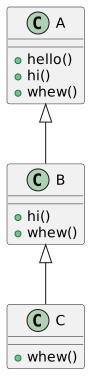
The following example demonstrates method overriding and how method calls are resolved in a class hierarchy.
public class TestOverriding {
    public static void main(String args[]) {
        C c = new C();
        c.hello();     // Calls A.hello()
        c.hi();        // Calls B.hi()
        c.whew();      // Calls C.whew()
    }
}
The UML diagram for this example would look as follows:
Example: The Shape Class
Let's look at another example.
Consider a class called Shape that contains a method calculateArea().
public class Shape {
    public double calculateArea() {
        return 0.0;
    }
}
The implementation of calculateArea() looks a bit strange. The reason is that there is no such thing as a truly generic shape. A Shape should always represent some concrete type of shape, such as a rectangle or a circle, each of which has its own way of calculating area.
As we mentioned in the instrument example, we will return to this issue in Chapter 3.3, Abstract Classes.
For now, let's create the subclasses Rectangle and Circle.
Since these shapes calculate their areas differently, each class should provide its own implementation of calculateArea().
public class Rectangle extends Shape {
    private double width;
    private double height;

    public Rectangle(double width, double height) {
        this.width = width;
        this.height = height;
    }

    @Override
    public double calculateArea() {
        return width * height;
    }
}
We can now write code that works with Shape objects without needing to know whether they are rectangles or circles.
public class Main {
    public static void main() {

        Shape shape1 = new Circle(5);
        Shape shape2 = new Rectangle(5, 7);

        IO.println(shape1.calculateArea());
        IO.println(shape2.calculateArea());
    }
}
Why Do We Need Polymorphism?
Polymorphism enables flexible and extensible program design in many ways. In object-oriented programming, polymorphism is particularly useful because it provides a unified way to work with objects that may be very different from one another.
When several classes inherit from the same superclass (or implement the same interface, which we will discuss later in Chapter 4.1 Interface), they can all be treated through a single common type. This allows a program to work with collections of diverse objects such as:
- all instruments (
Instrument), including guitars, pianos, and drums, - all vehicles (
Vehicle), including cars, bicycles, and airplanes, - all animals (
Animal), including dogs, cats, and birds, - all graphical user interface components (
Drawable), including buttons, text fields, and images, - all payment methods (
PaymentMethod), including credit cards, PayPal, and cash.
Java provides another way to distinguish object types through the instanceof operator.
For example:
if (instrument instanceof Guitar) {
    ((Guitar) instrument).playGuitar();
}
else if (instrument instanceof Piano) {
    ((Piano) instrument).playPiano();
}
In this course, we generally avoid using instanceof unless specifically instructed otherwise.
The reason is that frequent use of instanceof often indicates that inheritance and polymorphism are not being used effectively. It tends to lead to complicated chains of conditional statements like the example above and undermines one of the key benefits of object-oriented programming: hiding implementation details behind a common interface.
instanceof can still be appropriate in certain situations, such as:
- when we do not control the class hierarchy,
- when code operates at a system boundary, such as parsing external data, integrating with another system, or using reflection,
- when the alternative would be significantly more complex or require excessive code duplication.
Example of usage of instanceof operator
Consider a situation where a program receives messages (text messages, image messages) from an external system such as a JSON API, a network connection, or a third-party library. The message classes cannot be modified, and they share only a common supertype.interface Message { }
// Concrete message types (from an external library)
class TextMessage implements Message {
String text;
}
class ImageMessage implements Message {
byte[] data;
}
The program must process messages differently depending on their actual runtime type.
void process(Message message) {
    if (message instanceof TextMessage textMessage) {
        IO.println("Text: " + textMessage.text);
    } else if (message instanceof ImageMessage imageMessage) {
        IO.println( "Image size: " + imageMessage.data.length);
    } else {
        throw new IllegalArgumentException("Unknown message type");
    }
}
This is one of the rare situations where instanceof is genuinely the correct solution:
- The class hierarchy cannot be modified. The message classes come from an external library, so methods cannot be added to them.
- Polymorphism is not available. For example, we cannot define a
process()method in theMessageinterface. - Processing depends on the concrete runtime type. A text message and an image message require fundamentally different logic.
- The code belongs to a system boundary, such as an I/O layer, integration layer, or adapter layer.
Overriding Methods from the Object Class
In Java, all classes share a common superclass called Object.
This means that every class automatically inherits the attributes and methods of the Object class unless specified otherwise. The Object class contains several useful methods that can be overridden in subclasses.
One example is the toString() method, which provides a string representation of an object.
By default, the method returns the object's class name and hash code, which is often not very informative. We can override this method in our own classes so that it returns a representation that is more meaningful for our needs.
Let's create a Vector3D class representing a three-dimensional vector. In the main program, we create a few Vector3D objects and print their values.
public class Main {
    public static void main(String[] args) {
        Vector3D v1 = new Vector3D(1.0, 2.0, 3.0);
        Vector3D v2 = new Vector3D(4.0, 5.0, 6.0);

        IO.println("Vector 1: (" + v1.getX() + ", " + v1.getY() + ", " + v1.getZ() + ")");
        IO.println("Vector 2: (" + v2.getX() + ", " + v2.getY() + ", " + v2.getZ() + ")");
    }
}
Although the printing works, it would be much more convenient if we could simply write
IO.println("Vector 1: " + v1);
without explicitly retrieving coordinates and concatenating strings.
To accomplish this, we can override the toString() method in Vector3D.
public class Main {
    public static void main(String[] args) {
        Vector3D v1 = new Vector3D(1.0, 2.0, 3.0);
        Vector3D v2 = new Vector3D(4.0, 5.0, 6.0);

        IO.println("Vector 1: " + v1);
        IO.println("Vector 2: " + v2);
    }
}
The main program now looks considerably cleaner.
You are encouraged to explore other methods inherited from Object in the Java documentation.
Preventing Inheritance or Overriding (final Keyword)
Inheritance of a class or overriding of a method can be prevented using the final keyword.
When a class is declared with the final keyword, it cannot be inherited.
Similarly, when a method is declared with the final keyword, it cannot be overridden in a subclass.
Somewhat confusingly, the final keyword can also be used with variables. In that context, it means that the value of the variable cannot be changed after initialization. However, that usage is unrelated to inheritance.
Exercises
In the classes Product, Electronics, and Phone, override the toString() method. In each implementation, first call the superclass's toString() method and then append information from the class's own attributes to the resulting string.
A main program has been provided on the exercise page, which you can use to test your classes.
Example of what the program might print
HighPower Computer: 899.0 €
Original device warranty: 24 months

Aifoun42: 888.0 €
Original device warranty: 37 months
Operating system: AiOS
Connection type: 5G

----------------------------

--- NEW STORE PRODUCT ---
Light Bulb: 67000.0 €
Original device warranty: 73 months
Battery health: 100.00%
Range: 404.00 km

--- ACTIVATION AND CHARGING ---

Charging vehicle Light Bulb...
Charging vehicle Light Bulb...
Charging vehicle Light Bulb...
Charging vehicle Light Bulb...
Charging vehicle Light Bulb...

--- STATUS AFTER CHARGING ---

Light Bulb: 67000.0 €
Original device warranty: 73 months
Battery health: 99.50%
Range: 401.98 km
Further extend the class hierarchy. Add a class ElectricVehicle that inherits from the Electronics class.
Add the following to the class:
-
Attributes
- Constant
MAX_RANGE, which represents the maximum distance in kilometers that the electric vehicle can travel on a single charge. private double batteryHealth(as a percentage; between 0 and 100).
- Constant
-
Methods
charge(), which decreases the battery health by 0.1% each time the vehicle is charged.toString(), which first calls the superclass methodtoString(), and then appends the battery health as a percentage and the vehicle's range in kilometers. The range is calculated using the formula: (batteryHealth / 100 * MAX_RANGE)
Create a class Vehicle with an attribute String brand and a constructor that initializes this value. Also add a method move(), which does nothing.
Create the classes Car and Airplane that inherit from Vehicle. Add a move() method to both Car and Airplane that overrides the move() method from the Vehicle class.
A Car object should print "
Car <brand> drives down the highway with its tires squealing."
and an Airplane object should print:
"Airplane <brand> takes off from the runway and flies above the clouds.".
Create a main program in which you create two Vehicle variables (not Car or Airplane variables) and assign a Car object to one and an Airplane object to the other.
Call the move() method on both objects.
Add an attribute int mileage to the Car class. Add an attribute int flightHours to the Airplane class. Add a new constructor to both classes that initializes these attributes. Modify the existing constructor so that these attributes are assigned the value 0.
Modify the move() methods so that they increase these values. The move() method of the Car class should increase the mileage attribute by 10, and the move() method of the Airplane class should increase the flightHours attribute by 1.
Also override the toString() method in the Vehicle class so that it returns the text:
"Vehicle <brand> information: "
Then override this method in the Car and Airplane classes so that they also include the mileage or flight hours, respectively.