All Exercises in This Part
Create a class called Product. Give it the attributes name (a string) and
price (a decimal number). Initialize the attribute values in the constructor.
Also create a method void printDetails() that prints the product's name and
price in the format "Name: Price €".
Create the classes Clothing and Food that inherit from the Product
class. The constructors of the derived classes do not need to do anything
other than call the superclass constructor with the correct values.
Now create two different clothing items and two different food products in
your program and print their details by calling the
void printDetails() method.
Let's continue from the previous exercise. Also create a class Electronics
that inherits from the Product class. Add the following special features to
each subclass:
-
Clothing: attribute
String size(e.g., "M", "L", etc.), and a methodvoid tryOn(String customerSize)that prints whether the clothing item is suitable for the person trying it on. -
Electronics: attribute
int warrantyMonths(e.g., 24), and a methodint warrantyRemaining(int monthsElapsed)that returns how many months of warranty are left (or 0 if the warranty has expired). -
Food: attribute
String bestBefore(e.g., "31.01.2026"), and a methodvoid eat()that prints: "You consume food whose expiration date is DD.MM.YYYY." (replace DD.MM.YYYY with the value ofbestBefore).
Note that the constructors of the subclasses must now call the superclass constructor with the correct values and also initialize their own attributes.
A main program has been provided for you on the exercise page. Use it to test your classes. It must not produce any compilation or runtime errors. However, you may add your own code to the main program if you wish.
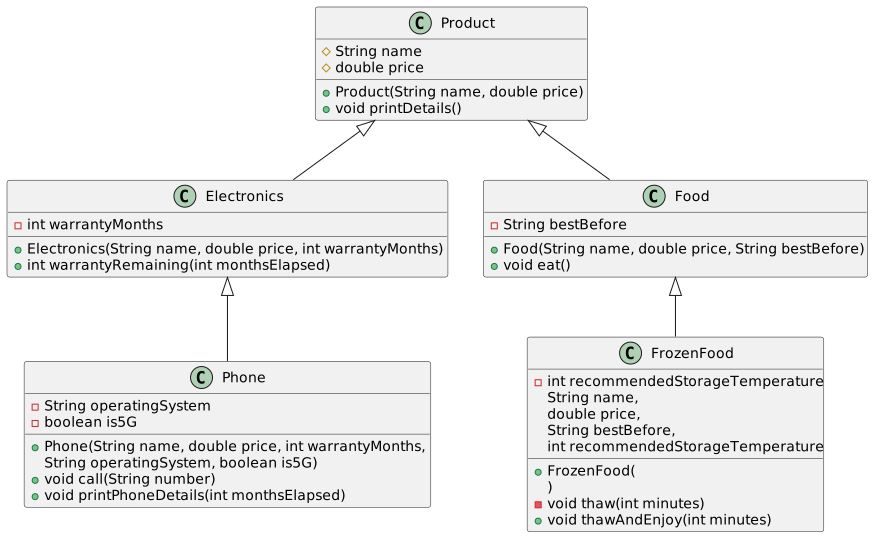
Extend the online store class hierarchy you created earlier according to the UML diagram below.
A main program has been provided on the exercise page, which you can use to test your classes. You can also view the sample output produced by the program.
Open the example output here.
Calling inherited methods:
Dulce & Käppänä Winter Jacket: 120.0 €
Reissurähjä Rye Bread: 2.5 €
HighPower Computer: 899.0 €

----------------------------

Calling subclass-specific methods:
Test 1: Trying it on a user who wears size M:
Trying on the clothing item Dulce & Käppänä Winter Jacket...
This may not be the best fit. You wear size M, but this clothing item is size L.

Test 2: Trying it on a user who wears size L:
Trying on the clothing item Dulce & Käppänä Winter Jacket...
Great! Size L fits you perfectly!

Eating Reissurähjä Rye Bread.
The best-before date was 20.12.2024. Hopefully it's still good.

Warranty remaining: 19 months.

pHone: 999.99 €
Phone warranty remaining: 19 months
Operating system: Orange
Connection type: 4G
Calling from Orange (4G) to 0401122330

Pea Bag: 0.99 €
You thawed the frozen food Pea Bag for 10 minutes.
Recommended storage temperature is -18 °C.
Eating Pea Bag.
The best-before date was 31.5.2026. Hopefully it's still good.
Task Description
Below is a description of the new classes and their required features. The same information can also be found in the UML diagram.
-
Phone(inherits fromElectronics)-
Add the attributes:
private String operatingSystem(e.g."Droid"or"AiOS")private boolean is5G
-
Add the methods:
public void call(String number). The method prints, for example:Calling from Orange (4G) to 0401122330public void printPhoneDetails(int monthsElapsed). The method should first call the inherited method (printDetails()), and then print additional phone-related information(remaining warranty, operating system and 5G support)
-
-
FrozenFood(inherits fromFood)-
Add the attribute:
private int recommendedStorageTemperature(e.g.-18)
-
Add the method:
private void thaw(int minutes)(note theprivatemodifier) When called, the method prints, for example:You thaw the frozen food for 10 minutes. Recommended storage temperature: -18 °C.
-
Add the method:
public void thawAndEnjoy(int minutes)- The method first calls
thaw(minutes)and then the inheritedeat()method.
-
UML Diagram
In the classes Product, Electronics, and Phone, override the toString() method. In each implementation, first call the superclass's toString() method and then append information from the class's own attributes to the resulting string.
A main program has been provided on the exercise page, which you can use to test your classes.
Example of what the program might print
HighPower Computer: 899.0 €
Original device warranty: 24 months

Aifoun42: 888.0 €
Original device warranty: 37 months
Operating system: AiOS
Connection type: 5G

----------------------------

--- NEW STORE PRODUCT ---
Light Bulb: 67000.0 €
Original device warranty: 73 months
Battery health: 100.00%
Range: 404.00 km

--- ACTIVATION AND CHARGING ---

Charging vehicle Light Bulb...
Charging vehicle Light Bulb...
Charging vehicle Light Bulb...
Charging vehicle Light Bulb...
Charging vehicle Light Bulb...

--- STATUS AFTER CHARGING ---

Light Bulb: 67000.0 €
Original device warranty: 73 months
Battery health: 99.50%
Range: 401.98 km
Further extend the class hierarchy. Add a class ElectricVehicle that inherits from the Electronics class.
Add the following to the class:
-
Attributes
- Constant
MAX_RANGE, which represents the maximum distance in kilometers that the electric vehicle can travel on a single charge. private double batteryHealth(as a percentage; between 0 and 100).
- Constant
-
Methods
charge(), which decreases the battery health by 0.1% each time the vehicle is charged.toString(), which first calls the superclass methodtoString(), and then appends the battery health as a percentage and the vehicle's range in kilometers. The range is calculated using the formula: (batteryHealth / 100 * MAX_RANGE)
Create a class Vehicle with an attribute String brand and a constructor that initializes this value. Also add a method move(), which does nothing.
Create the classes Car and Airplane that inherit from Vehicle. Add a move() method to both Car and Airplane that overrides the move() method from the Vehicle class.
A Car object should print "
Car <brand> drives down the highway with its tires squealing."
and an Airplane object should print:
"Airplane <brand> takes off from the runway and flies above the clouds.".
Create a main program in which you create two Vehicle variables (not Car or Airplane variables) and assign a Car object to one and an Airplane object to the other.
Call the move() method on both objects.
Add an attribute int mileage to the Car class. Add an attribute int flightHours to the Airplane class. Add a new constructor to both classes that initializes these attributes. Modify the existing constructor so that these attributes are assigned the value 0.
Modify the move() methods so that they increase these values. The move() method of the Car class should increase the mileage attribute by 10, and the move() method of the Airplane class should increase the flightHours attribute by 1.
Also override the toString() method in the Vehicle class so that it returns the text:
"Vehicle <brand> information: "
Then override this method in the Car and Airplane classes so that they also include the mileage or flight hours, respectively.
Create an abstract class Message with an attribute String message, which is initialized in the constructor. Set the visibility of the message attribute to be as restrictive as possible. The class also contains an abstract method void send().
Create the classes Email and TextMessage that inherit from Message. Both classes should have a constructor that calls the superclass constructor. Implement the send() method in both classes.
The send() method of the Email class should print
"Sending email: <message>" and
the send() method of the TextMessage class should print
"Sending text message: <message>".
Modify the Vehicle class and its move() method from Exercise 3.6 to be abstract.
Keep the toString() method as a regular (non-abstract) method.
-
Create an abstract class
CommunicationChannel. It has an attributeString recipient, which is initialized in the constructor. Add an abstract methodsendInternally(String message)that does not return a value. -
Also create a method
String getRecipient(), which returns the recipient. -
Create a concrete method
send(String message)that immediately exits (return) if the message is empty ornull. Otherwise, the method should call the abstract methodsendInternally(String message). -
Create the classes
EmailandTextMessagethat inherit fromCommunicationChannel. In both classes, override the abstract methodsendInternally(String message), which prints a message to the console in the format "Sending <channel> to <address/number>: <message>". For example "Sending email to matti@maikalainen.com: Hi, what's up?" or "Sending text message to 0401234567: Welcome to the course!".
Create a MessagingService class to which different CommunicationChannel objects can be added using the method
addChannel(CommunicationChannel channel)
Also add a method
sendToAll(String message)
which sends the message through all channels at once.
Optional extra challenges (no points awarded, but they are included in the model solution):
- Modify the
CommunicationChannelclass so that it accepts a list of recipients instead of just one recipient. As a result, thesendInternallymethods must also be modified. - Add a character limit (e.g. 80 characters) to the
TextMessageclass. If a message exceeds this limit, it should be split into multiple parts according to the character limit.