Abstract Classes
Learning Objectives
After completing this chapter, you will:
- Be able to create abstract classes and abstract methods in Java.
- Understand the concepts of abstract classes and abstract methods, as well as their benefits in object-oriented programming.
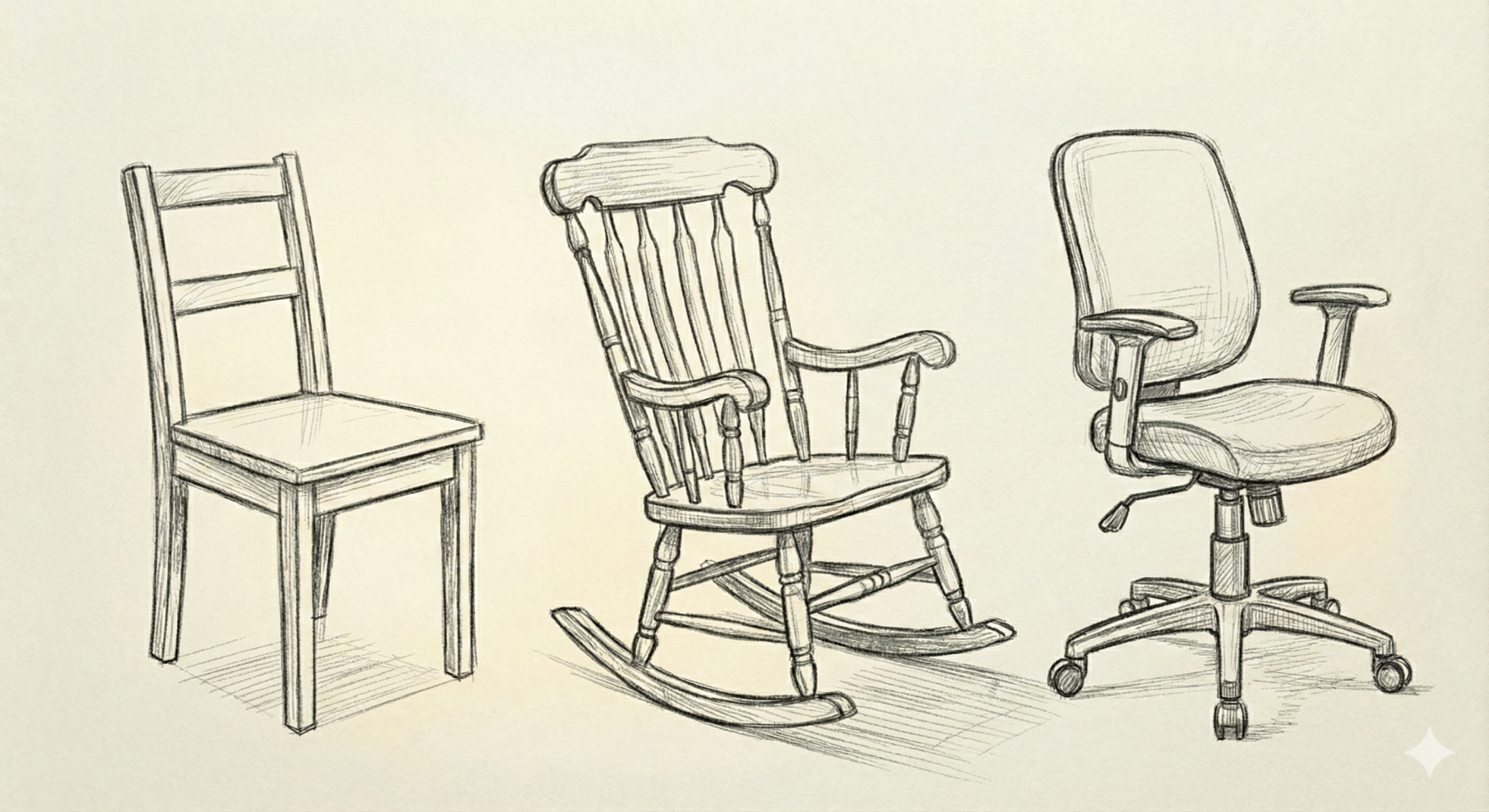
When designing superclass–subclass relationships, we may encounter situations where it is useful to create a superclass that defines shared functionality, but where creating instances of the superclass itself does not make sense.
Consider the concept of a chair. While the word chair probably brings a specific image to mind, there are actually many different kinds of chairs: wooden chairs, rocking chairs, office chairs, and so on. Each type of chair is somewhat different. One could argue that the concept of a chair is itself an abstraction. A chair is essentially just something that enables sitting. To describe an actual physical chair that could be manufactured, we need a more specific concept, such as an office chair.
Let's look at another example that is closer to actual code.
We'll continue the Shape example from the previous chapter. In principle, we could create an instance of Shape and call its calculateArea() method.
Shape shape = new Shape();
double area = shape.calculateArea();
IO.println("The area of the shape is " + area); // 0.0
However, this doesn't really make sense.
A Shape object does not represent any concrete shape. It is merely a general concept from which concrete shapes such as Circle and Rectangle inherit.
This becomes especially obvious when we try to print the area of such a generic shape.
The Shape class is therefore intended only to be inherited from, and creating direct instances of it is not meaningful.
Let's make Shape an abstract class and calculateArea() an abstract method.
public abstract class Shape {
    public abstract double calculateArea();
}
After this change, instances of Shape can no longer be created.
Shape shape = new Shape();
java: Shape is abstract; cannot be instantiated
An abstract class is a class that allows us to express this idea directly in code. An abstract class cannot be instantiated directly. Instead, it serves only as a foundation for classes that inherit from it. An abstract class may contain: abstract methods (methods without an implementation) and also concrete methods (methods with an implementation). A subclass must implement all abstract methods unless the subclass itself is also abstract.
note
At this point, it is worth briefly considering the student information system from the previous chapter: do we actually need plain Person objects at all, or is every person really something more specific, such as a student or teacher?
Example: Smart Home
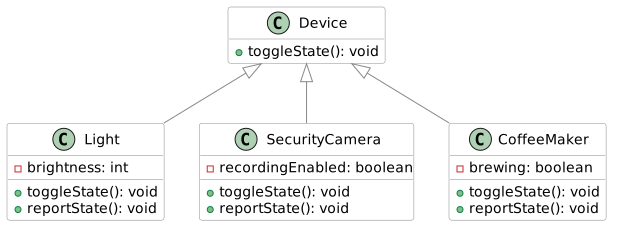
A smart home might contain many different kinds of devices, such as lights, security cameras, and of course a smart coffee maker.
Let's assume that every device has an operation called toggleState(), which performs the device's primary action( for example a light turns on or off, a security camera starts or stops recording, a coffee maker starts or stops brewing coffee.)
Each device should also be able to report its current state through a method called reportState().
We'll begin with a simple example where a device can only switch between two states. More advanced controls will be considered later.
Our class diagram might look like this:
public class Main {
    public static void main() {
        Device[] devices = {
            new Light(),
            new SecurityCamera(),
            new CoffeeMaker()
        };

        for (Device device : devices) {
            device.toggleState();
            device.reportState();
        }
    }
}
If we examine the Device class, we notice that its methods toggleState() and reportState() do nothing.
In theory, we could also create instances of Device directly and call its methods:
Device device = new Device();

device.toggleState();  // Does nothing
device.reportState();  // Does nothing
As we can see, nothing happens when these methods are called, making Device objects largely useless.
It doesn't really make sense to have some generic "device" without knowing what type of device it is.
Therefore, the Device class is really intended only for inheritance.
Let's make Device an abstract class. Since its methods are also intended to be implemented by subclasses, we will make those methods abstract as well.
All subclasses must implement these methods, as they already do in our example.
public class Main {

    public static void main() {
        Device[] devices = {
            new Light(),
            new SecurityCamera(),
            new CoffeeMaker()
        };

        for (Device device : devices) {
            device.toggleState();
            device.reportState();
        }
    }
}
Just as in the earlier Shape example, instances of Device can no longer be created.
Device device = new Device();
java: Device is abstract; cannot be instantiated
The class diagram looks almost the same as before, but now Device is marked as an abstract class, and its methods are marked as abstract methods. In UML notation, abstract classes and abstract methods are written in italics.
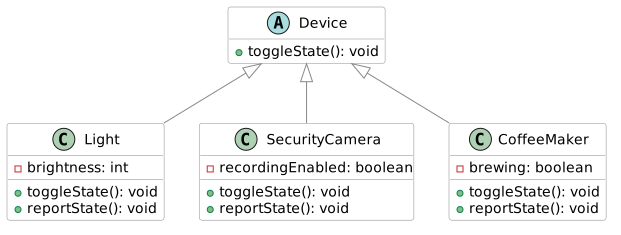
The opposite of an abstract class is often called a concrete class, meaning a class that can be instantiated. For example, Light, SecurityCamera, and CoffeeMaker are concrete classes because objects can be created from them.
Why Are Abstract Classes Useful?
An abstract class is not merely a way to prevent instantiation.
Its primary purposes are:
- to define a common contract that all subclasses must follow, and
- to provide shared attributes and implementations so that subclasses can focus only on their unique behavior.
Because Device is abstract, we can add attributes and method implementations that all subclasses share.
Let's add the attribute name, representing the device's name, and the attribute poweredOn, indicating whether the device is currently powered on.
These attributes are useful for all devices and therefore belong naturally in the abstract superclass.
public abstract class Device {

    // HIGHLIGHT_GREEN_BEGIN
    private String name;
    private boolean poweredOn;
    // HIGHLIGHT_GREEN_END

    public abstract void toggleState();
    public abstract void reportState();
}
If we were modeling network devices, useful or even mandatory attributes might include a MAC address and an IP address. To keep the example simple, however, we will limit ourselves to the device name and power state.
Let's also add the methods powerOn() and powerOff(), which provide common startup and shutdown logic that all devices can follow.
public abstract class Device {
    private String name;
    private boolean poweredOn;

    // HIGHLIGHT_GREEN_BEGIN
    protected Device(String name) {
        this.name = name;
        this.poweredOn = false; // default
    }

    public void powerOn() {
        if (!poweredOn) {
            poweredOn = true;
            IO.println(name + " is powering on.");
        }
    }

    public void powerOff() {
        if (poweredOn) {
            poweredOn = false;
            IO.println(name + " is powering off.");
        }
    }
    // HIGHLIGHT_GREEN_END

    public abstract void toggleState();
    public abstract void reportState();
}
Notice that because we decided every device must have a name, the name must now be supplied as a constructor parameter. As a result, we can no longer create instances using a parameterless constructor.
Light light = new Light();
Light.java
java: constructor Device in class Device cannot be applied to given types;
  required: java.lang.String
  found: no arguments
  reason: actual and formal argument lists differ in length
Creating an object now requires a name, for example:
new Light("PhilipsHue");
Therefore, each subclass constructor must call the superclass constructor.
Let's make this change in all subclasses.
public class Main {

    public static void main() {
        Device[] devices = {
            new Light("PhilipsHue"),
            new CoffeeMaker("Moccamaster"),
            new SecurityCamera("Reolink")
        };

        for (Device device : devices) {
            device.powerOn();
            device.toggleState();
            device.reportState();
            device.powerOff();
        }
    }
}
Subclasses now inherit the power-on and power-off logic directly, but they are required to implement the device-specific functionality themselves. This creates a balance between flexibility and enforced structure: changing state and reporting state are mandatory, the implementation of those operations is up to each individual device, startup and shutdown behavior is shared by all devices.
Visibility of Methods in Abstract Classes
Abstract methods follow the same visibility rules as other methods.
Abstract methods are usually declared either public or protected so that subclasses can implement them.
If a method will be called by code that uses objects of the class, the method should be public.
If the method is intended for use only within subclasses, protected is sufficient.
It is important to note that a subclass implementation cannot reduce visibility.
For example, a public abstract method cannot be implemented as a protected method in a subclass.
Concrete methods may also be declared private. In that case they serve as internal helper methods and are not visible to subclasses.
An abstract method cannot be declared private.
Template Method Pattern
An abstract class may also contain a concrete method whose implementation calls an abstract method. This design is known as the Template Method pattern. The abstract class defines the overall algorithm or workflow, while delegating specific steps to subclasses.
The previously implemented parts have been hidden from the code. You can reveal them by clicking the eye icon in the upper-right corner of the code area.
public abstract class Device {
    private String name;
    private boolean poweredOn;

    protected Device(String name) {
        this.name = name;
    }

    public final void performUpdate() {
        powerOn();
        prepareUpdate(); // Abstract step implemented by subclasses
        update();
        powerOff();
    }

    protected abstract void prepareUpdate();

    private void update() {
        IO.println("Downloading the latest update from the network...");
        IO.println("Updating device...");
    }

    public void powerOn() {
        if (!poweredOn) {
            poweredOn = true;
            IO.println(name + " is powering on.");
        }
    }

    public void powerOff() {
        if (poweredOn) {
            poweredOn = false;
            IO.println(name + " is powering off.");
        }
    }

    public abstract void toggleState();
    public abstract void reportState();
}
performUpdate() now acts as a predefined recipe that subclasses cannot modify because it is declared final.
The subclasses instead customize the recipe by implementing the abstract methods required by the process.
🤔 Something to think about: In what situations would you want to prevent a subclass from overriding a particular method?
Exercises
Create an abstract class Message with an attribute String message, which is initialized in the constructor. Set the visibility of the message attribute to be as restrictive as possible. The class also contains an abstract method void send().
Create the classes Email and TextMessage that inherit from Message. Both classes should have a constructor that calls the superclass constructor. Implement the send() method in both classes.
The send() method of the Email class should print
"Sending email: <message>" and
the send() method of the TextMessage class should print
"Sending text message: <message>".
Modify the Vehicle class and its move() method from Exercise 3.6 to be abstract.
Keep the toString() method as a regular (non-abstract) method.
-
Create an abstract class
CommunicationChannel. It has an attributeString recipient, which is initialized in the constructor. Add an abstract methodsendInternally(String message)that does not return a value. -
Also create a method
String getRecipient(), which returns the recipient. -
Create a concrete method
send(String message)that immediately exits (return) if the message is empty ornull. Otherwise, the method should call the abstract methodsendInternally(String message). -
Create the classes
EmailandTextMessagethat inherit fromCommunicationChannel. In both classes, override the abstract methodsendInternally(String message), which prints a message to the console in the format "Sending <channel> to <address/number>: <message>". For example "Sending email to matti@maikalainen.com: Hi, what's up?" or "Sending text message to 0401234567: Welcome to the course!".
Create a MessagingService class to which different CommunicationChannel objects can be added using the method
addChannel(CommunicationChannel channel)
Also add a method
sendToAll(String message)
which sends the message through all channels at once.
Optional extra challenges (no points awarded, but they are included in the model solution):
- Modify the
CommunicationChannelclass so that it accepts a list of recipients instead of just one recipient. As a result, thesendInternallymethods must also be modified. - Add a character limit (e.g. 80 characters) to the
TextMessageclass. If a message exceeds this limit, it should be split into multiple parts according to the character limit.